


Having a problem with our online banking site or mobile app? Fill out the form to the right. →
Community updated its online banking site and mobile app on Thursday, November 5, 2026.
Beware of Fraud
During this time, be on the lookout for bad actors trying to commit fraud. Individuals may impersonate bank employees and ask customers for usernames, passwords, or other Online Banking credentials. The bank will never email, text, or call asking for your User ID or Password. When in doubt, call the bank at 773-685-5300.
Quick Questions
- How do I access the updated app?
- What if I forgot my User ID or Password?
- What are the new User ID and Password requirements?
- What if I don't see my phone number when prompted with multi-factor authentication?
- What if I use biometrics (fingerprint or face ID) to log in?
- How do I add biometrics (fingerprint or face ID) on the new site?
- Will my scheduled bills get paid?
- Continue reading Frequently Asked Questions
Resources


How do I access the updated Mobile Banking app?
You have two options:
1. Through the Current Mobile Banking App
Open your existing app and follow the prompt to download the new version. After installation, log in using your current User ID and Password.
OR
2. Direct Download
Search for “CSB Chicago Mobile Banking” in your device’s app store, download the new app, and log in with your existing credentials.
Once the new app has been downloaded, you should delete the old app.
What if I forgot my User ID or Password?
If you are logging in for the first time and do not remember your User ID and Password, you can click the “Forgot Password?” and “Forgot Username” links. More information is also listed in the “Sign in Problems FAQ” link.
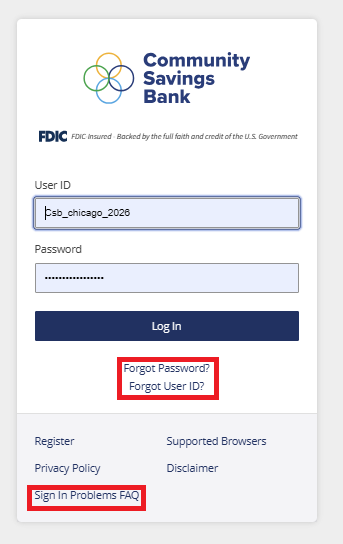
Please note, the “Forgot User ID” link is not available on our mobile app. To access to this link, visit communitysavingsbank.bank, click the “Log In” box on our homepage, then click, “Forgot User ID.”
What are the new User ID and Password requirements?
Enhanced Digital Banking has stronger User ID and Password requirements.
If your User ID is fewer than nine characters, you will be prompted to change it the first time you log into the Enhanced Digital Banking site.
Password requirements are also changing. The updated site requires passwords to be between 12 - 32 characters long. The password must contain at least one letter, one number, and a special character from the following list: ~`@#$%^&*()_-+={[]}|\”<,>.?/ and space.
What if I use biometrics (fingerprint or Face ID) to log in?
If you normally log in using biometrics, make sure you know your User ID and Password before the upgrade. You’ll need to enter these credentials the first time you access the new system. Once you’ve logged in successfully, you can re-enable biometric authentication for future logins.
Will my scheduled bills get paid?
Scheduled payments will transfer to the new system. Your payment history will not. Please be sure to save a copy of this prior to Tuesday, November 3, 2026.
Payee addresses in Bill Pay need to be complete and accurate for payee information to transfer to the new system. Please review and make corrections by Tuesday, November 3, 2026.
We also recommend making note of your current payees and account numbers to ensure you can confirm all information transferred correctly once the new system is live.