

What is “Enhanced Digital Banking?”
On November 5, 2026, the bank will be making updates to its online banking site and mobile app. We’re calling these updates, “Enhanced Digital Banking.”
When will “Enhanced Digital Banking” go live?
Enhanced Digital Banking, or updates to the online banking site and mobile app, will go live on Thursday, November 5, 2026.
Will the online banking site and the mobile app experience disruptions during the upgrade process?
Yes. The online banking site and mobile app will experience disruptions starting on Tuesday, November 3, 2026 through the morning of Thursday, November 5, 2026. Expect view-only access during these dates with no access to notifications, transfers, bill payment, and Zelle®.
What outages will occur?
Yes. Prepare for notifications, transfers, bill payment, and Zelle® to be down from Tuesday, November 3, 2026 through the morning of Thursday, November 5, 2026.
If you have payments to make during these dates, schedule them ahead of time.
Will this affect my account details?
Most of your account information will remain intact and ready for use. This includes your transaction history, bill pay payees, scheduled payments, internal transfers, and eStatement preferences.
Please note: Alerts, card controls, external transfers, and personal finance manager data will not carry over to the new system. These features will need to be reconfigured once the upgrade is complete on Thursday, November 5, 2026.
Also, scheduled bill payments will transfer to the new system, but your payment history will not. Be sure to record or save this information before Tuesday, November 3, 2026.
What will change with “Enhanced Digital Banking”?
The biggest change to customers will be the appearance of the online banking site and mobile app. Some other notable changes are listed below:
- Access Zelle® outside of Bill Pay.
- View your full account number.
- Manage cards feature from the online banking site and mobile app.
- Write and reply to messages to bank staff.
- Request stop payments for a single check or range of checks.
- Dispute transactions that are posted.
Will this upgrade affect the Mobile Banking app?
Yes. As part of this upgrade, we’re introducing an updated Mobile Banking app, which will be available for download starting November 5, 2026.
How do I access the updated Mobile Banking app?
You have two options:
1. Through the Current Mobile Banking App
Open your existing app and follow the prompt to download the new version. After installation, log in using your current User ID and Password.
OR
2. Direct Download
Search for “CSB Chicago Mobile Banking” in your device’s app store, download the new app, and log in with your existing credentials.
Once the new app has been downloaded, you should delete the old app.
How do I access the updated online banking site?
Access the updated online banking site through the login box on the bank’s homepage starting Thursday, November 5, 2026.
What are the bank’s online banking site and mobile app?
The online banking site is a secure website where customers can manage their bank accounts. While the online banking site is accessed through the login box of the bank’s website, it is a separate site entirely from the bank’s website, communitysavingsbank.bank. The mobile app is an application where customers can manage their bank accounts from their tablet or mobile phone. Download "CSB Chicago Mobile Banking" from the Google Play or Apple app store.
Will scheduled bill payments migrate to the updated site?
Scheduled payments will transfer to the new system. Your payment history will not. Please be sure to save a copy of this prior to Tuesday, November 3, 2026.
Payee addresses in Bill Pay need to be complete and accurate for payee information to transfer to the new system. Please review and make corrections by Tuesday, November 3, 2026.
We also recommend making note of your current payees and account numbers to ensure you can confirm all information transferred correctly once the new system is live.
Will saved notifications/alerts transfer to the new system?
Email notifications will transfer to the new system, but SMS and push notifications will not. Please make note of or save your current settings and any related history for these services before Tuesday, November 3, 2026. You will need to set these services up or register for them again once the new system is live.
Is the website changing again?
No. The website is not changing at all. We are updating our mobile banking app and online banking site. While the online banking site is accessed through the login box of the bank’s website, it is a separate site entirely from the bank’s website, communitysavingsbank.bank.
Will Enhanced Digital Banking affect the login process?
When first logging in, yes. After the new system launches, you’ll be prompted to sign in with your current User ID and Password. During your first login, you’ll be prompted to verify your identity by choosing either a text message or phone call to receive a one-time passcode. Enter the passcode and submit to complete a secure login.
Some users will be prompted to update their User ID and Password upon logging in for the first time. (The updated site requires a User ID to be at least nine characters and a Password to be between 12 - 32 characters).
What if I use biometrics to log in?
If you normally log in using biometrics, make sure you know your User ID and Password before the upgrade. You’ll need to enter these credentials the first time you access the new system. Once you’ve logged in successfully, you can re-enable biometric authentication for future logins.
What if I don’t know my Username or Password?
If you’re unsure of your User ID, please call us at 773-685-5300 for assistance. If you’ve forgotten your Password, you can reset it by selecting “Forgot Password” on the Online Banking login box and following the instructions provided.
What if I forget my Username or Password when logging into Enhanced Digital Banking for the first time?
If you are logging in for the first time and do not remember your User ID and Password, you can click the “Forgot Password?” and “Forgot Username” links. More information is also listed in the “Sign in Problems FAQ” link.
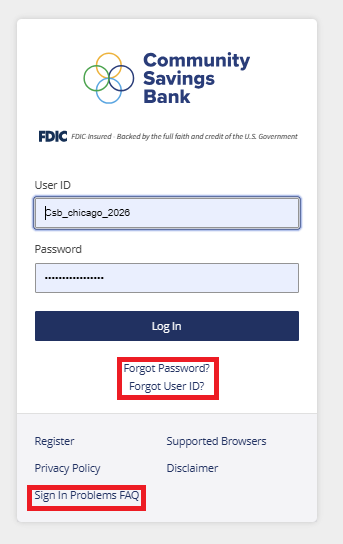
Please note, the “Forgot User ID” link is not available on our mobile app. To access to this link, visit communitysavingsbank.bank, click the “Log In” box on our homepage, then click, “Forgot User ID.”
Will my user ID and password stay the same?
It depends. Enhanced Digital Banking has stronger User ID and Password requirements.
If your User ID is fewer than nine characters, you will be prompted to change it the first time you log into the Enhanced Digital Banking site.
Password requirements are also changing. The updated site requires passwords to be between 12 - 32 characters long. The password must contain at least one letter, one number, and a special character from the following list: ~`@#$%^&*()_-+={[]}|\”<,>.?/ and space.
What action items should I consider post-upgrade?
You’ll need to set up any alerts, card controls, external transfers, and Personal Finance Manager settings again, as these will not carry over to the new system. To use Personal Finance Manager, you’ll need to re-register before adding your new preferences.
Please note: Internal transfers will appear in the new system, but if you want to make changes, you’ll need to create a new transfer and delete the old one.
What are the benefits of Online Banking?
Online Banking gives you convenient tools to manage your finances anytime, anywhere:
- Pay bills or send money to friends, family, or others with ease.
- Access your accounts on the go using our new Mobile Banking app.
- Move funds between your accounts or transfer to other financial institutions.
- Track spending, create budgets, and set goals with our Personal Finance Manager.
- Check your credit score and monitor changes every time you log in.
- Manage and protect your cards with advanced controls.
- Stay informed and safeguard your accounts with customizable alerts.
What type of accounts can be viewed within Online Banking?
You can access your checking and savings accounts, along with any loans you have with us, all in one place.
How do I enroll for Online Banking?
Enrollment is quick and easy—sign up online or through our Mobile Banking app. If you need help, contact us at 773-685-5300.
Why should I pay my bills online?
Online bill payment saves time and money—no checks, no stamps, no trips to the mailbox. You can track all your payments, schedule automatic payments, and pay nearly any bill—utilities, mortgage, even lawn care—with just a few clicks.
How do I enroll for Bill Pay?
Log in to Online or Mobile Banking, select “Bill Pay,” and complete the enrollment form. Once enrolled, you’re ready to start paying bills online. Please note: You must be enrolled in Online Banking before signing up for Bill Pay.
What is the benefit of using Mobile Banking?
Mobile Banking makes managing your accounts simple and secure—anytime, anywhere. You’ll need your User ID and Password for your first login after the upgrade. Once logged in, you can enable biometric authentication for future access.
What options are available for accessing Mobile Banking?
Mobile Banking can be accessed as follows via any mobile device.
- Mobile Banking App: Download and install the app, CSB Chicago Mobile Banking, then log in using your Online Banking credentials.
- Mobile Browser: Visit communitysavingsbank.bank on your mobile device and log in with the same username and password.
How does Mobile Deposit work?
Using our Mobile app, select “Deposits” from the menu, enter the check amount, endorse the check, and take photos of the front and back. Submit, and you’re done! That’s it!