

Recently, the bank received a call from a person claiming to work for Google. The caller ID read, “GOOGLE,” and the man calling asked for the bank’s Google ad credentials to access the bank’s Google ad profile.
When the bank’s operator asked the caller questions to verify his identity, the caller complained about the bank’s customer service and asked to speak with a manager.
When the caller was connected with a manager, he was asked again to verify his identity and the caller disconnected shortly after.
The man called back again and tried to pressure different staff members to give away the bank’s Google ad credentials. After being questioned by several staff members, the caller gave up.
While the bank’s staff successfully prevented this phishing attempt, it raises questions about what information this scammer was after and lessons to be learned from it.
This phish is an example of a new scamming technique: “Malvertising.” With this scam, criminals bait businesses for their Google ad credentials and then post fake ads on behalf of the business, called malvertising, to lure consumers to click on malicious links. Once the consumer clicks on the malicious link, the scammer collects personal information about the victim to commit fraud.
Prevent falling victim to one of these phishing attempts with some advice below:
Lessons for Businesses
Never Give Away Login Credentials
If a person calls asking for login credentials to a site, assume it is a scam. If you believe the call may be legitimate, call the business with the information you have on file.
Just Hang Up
If a person calls and pressures you or your staff to give away information, just hang up.
Ask for Verification
If a caller claims to be working on behalf of a company, ask the caller to verify his or her identity.
Don’t Trust Caller IDs
Bad actors can spoof a caller ID to make the call appear to be from a legitimate business when it is not.
Lessons for Consumers
Verify Google Ads
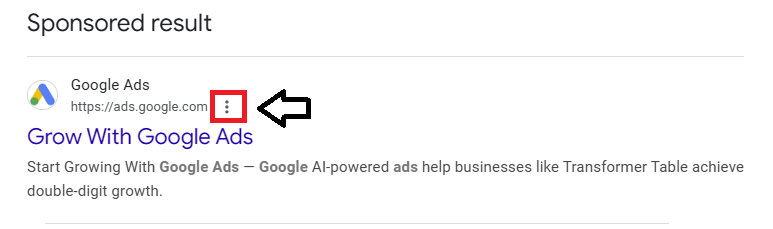
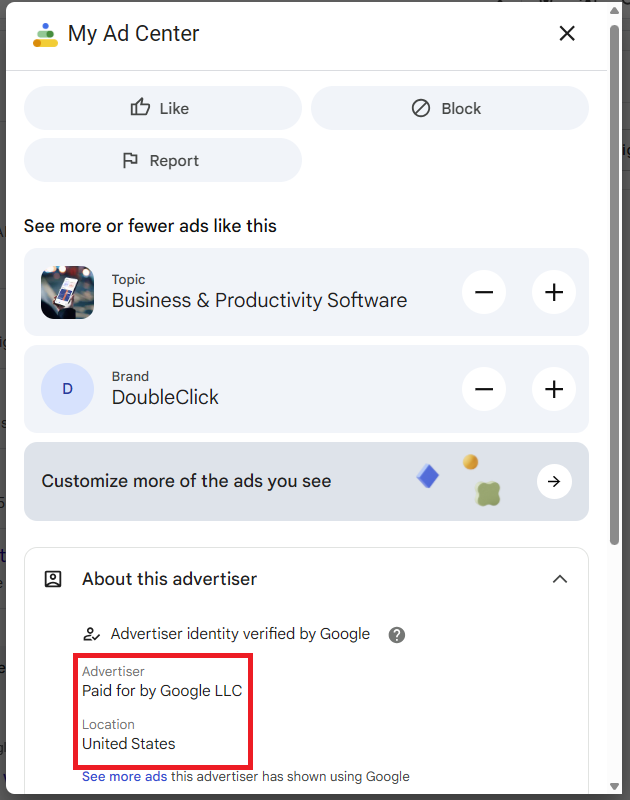
Before you click on a Google ad, click the three dots to check the advertiser and location. If something seems fishy, don’t click the ad.
Review the Google Ad URL
Upon clicking on a Google Ad, look at the URL. Does it contain extra characters or a word before the site’s domain name? Carefully review the URL before inputting any personal information.

Act with Skepticism
Just because an ad is featured on Google, it doesn’t mean the ad is legitimate. Act with skepticism when searching businesses online.